一个小例子
先别管三七二十一,先写一个简单的 MCP,搞出来看下啥效果。
// MCP 服务端:hello_world 工具,根据 user_name 返回问候语。
package main

import (
    "context"
    "log"

    "github.com/modelcontextprotocol/go-sdk/mcp"
)

func main() {
    // new 一个 server
    server := mcp.NewServer(&mcp.Implementation{
        Name:    "hello-world",
        Version: "0.1.0",
    }, nil)

    // 注册 hello_world 工具,分为工具元信息和 handler 两个部分
    mcp.AddTool(server, &mcp.Tool{
        Name:        "hello_world", // 工具名称
        Description: "根据 user_name 返回问候语", // 工具描述
    }, helloWorldTool)

    // 启动 server
    if err := server.Run(context.Background(), &mcp.StdioTransport{}); err != nil {
        log.Printf("server stopped: %v", err)
    }
}

// 输入参数结构体
type helloInput struct {
    UserName string `json:"user_name" jsonschema:"调用方用户名"`
}


func helloWorldTool(ctx context.Context, req *mcp.CallToolRequest, in helloInput) (*mcp.CallToolResult, any, error) {
    text := "Hello World, " + in.UserName
    return &mcp.CallToolResult{
        Content: []mcp.Content{
            &mcp.TextContent{Text: text},
        },
    }, nil, nil
}
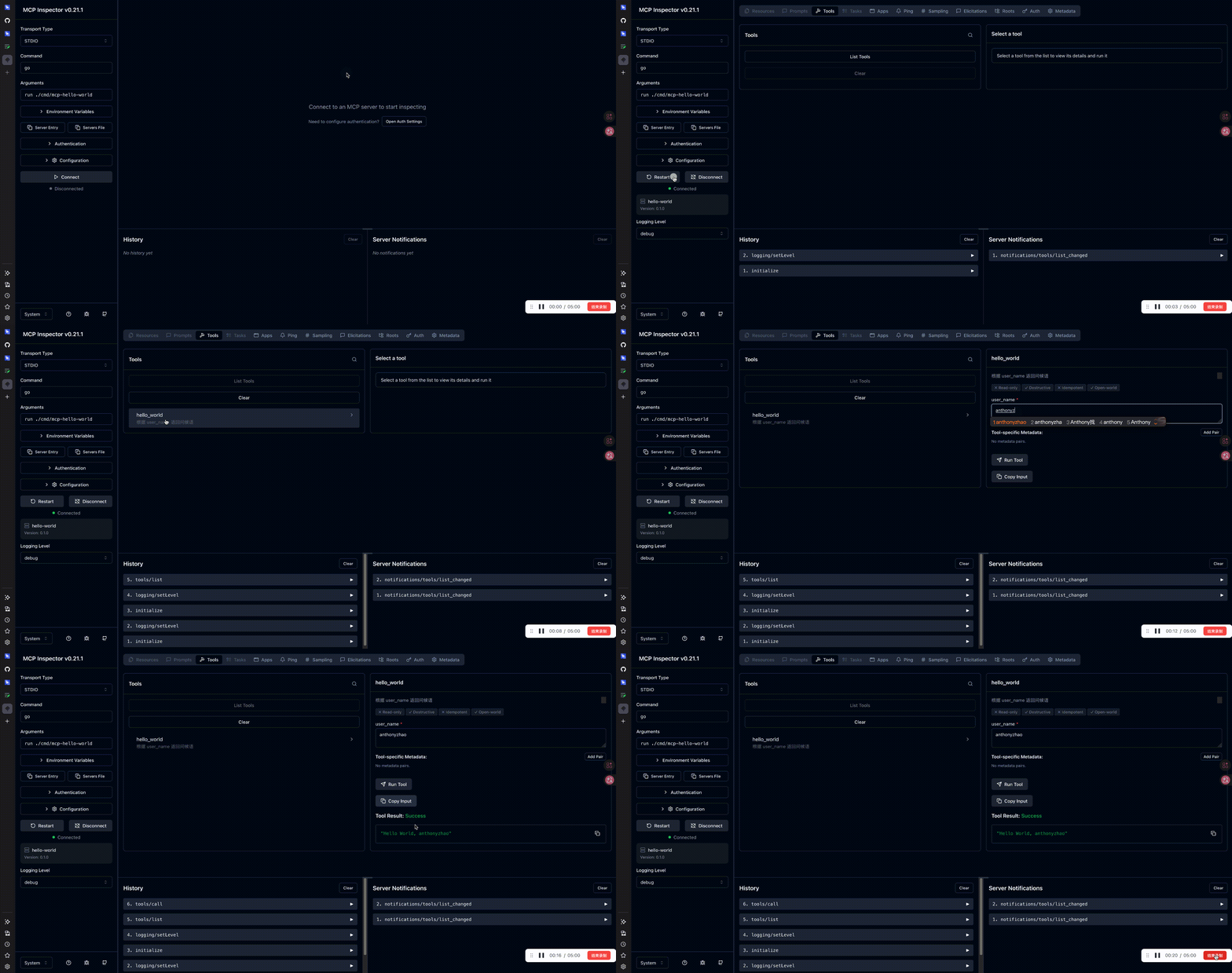
使用如下命令启动服务,需要安装Node.Js
npx @modelcontextprotocol/inspector go run ./cmd/mcp-hello-world
# 替换你自己的代码路径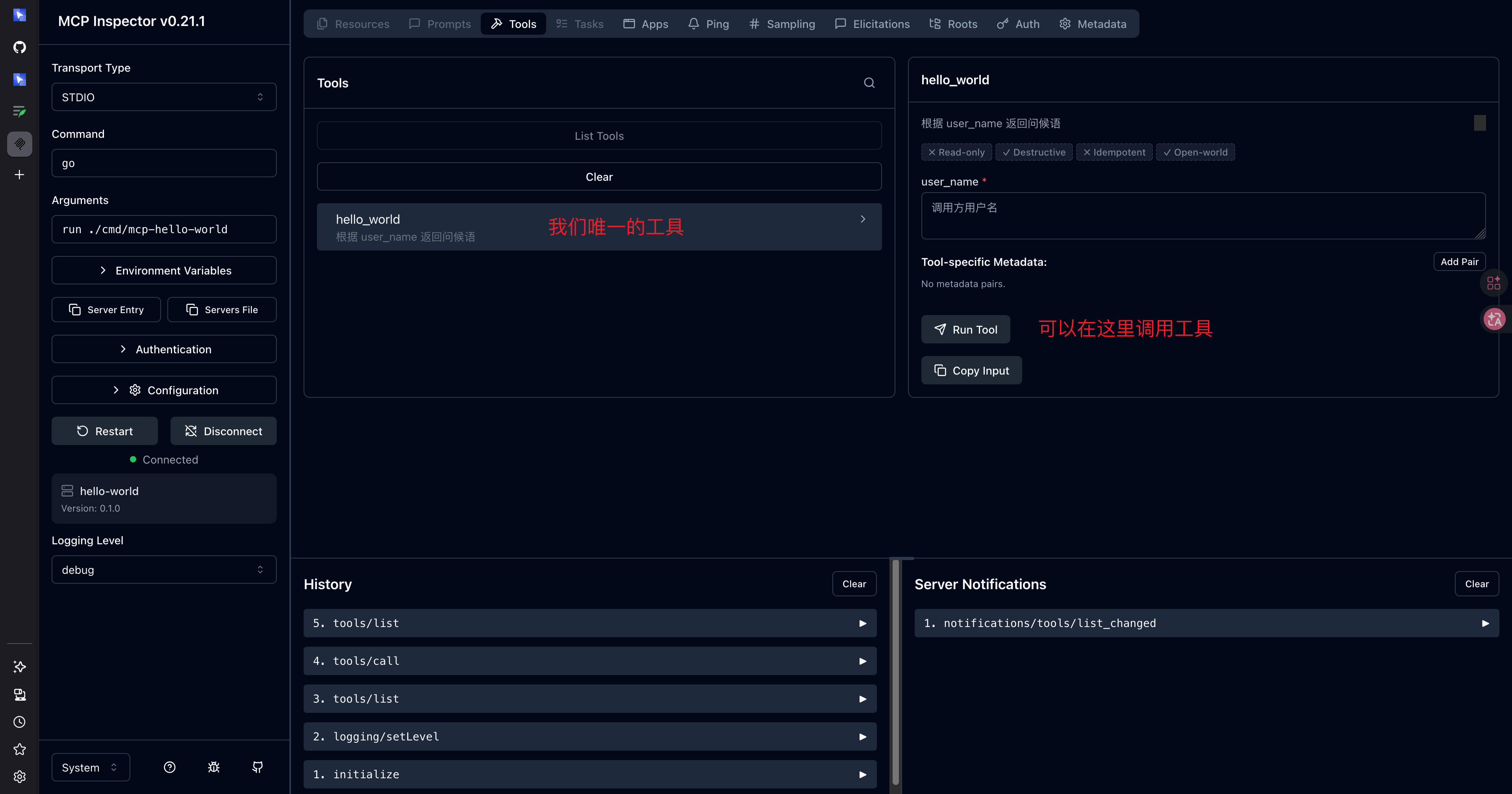
代码解释
new 一个server
server := mcp.NewServer(&mcp.Implementation{
		Name:    "hello-world",
		Version: "0.1.0",
	}, nil)
这里使用 mcp.Implementation 创建了一个 server。mcp.Implementation字段如下
| 字段名 | 含义 |
|---|---|
| Name | Mcp 的唯一标识,当title为空时展示该名称 |
| Title | 给界面和最终用户看的标题。 |
| Version | 该 MCP 实现的版本号 |
| WebsiteURL | 与该 Server 相关的网站/文档主页链接,没有则可不写。 |
| Icons | 在客户端里展示 Server 时用的图标列表(类型为 []Icon),没有则可不写。 |
注册一个工具
mcp.AddTool(server, &mcp.Tool{
		Name:        "hello_world", // 工具名称
		Description: "根据 user_name 返回问候语", // 工具描述
	}, helloWorldTool)
给服务添加一个工具。本框架设计时,工具的元信息和工具的能力即handler是分开的。
mcp.Tool是工具的元信息,包含的字段如下
| 字段名 | 含义 |
|---|---|
| Annotations | 可选补充信息;展示名优先级:Title → annotations.title → Name。 |
| Description | 工具的描述,用来给人看的,也用来给AI理解工具功能的。 |
| InputSchema | 可选,输入的json schema。当该字段未设置时,会使用handler的输入结构体作为默认schema |
| Name | 工具唯一标识 |
| OutputSchema | 可选,输出的json schema.当该字段未设置时,会使用handler的输出结构体作为默认schema |
| Title | 面向 UI/最终用户的标题,要求好读; |
| Icons | 工具在界面中的图标列表。 |
工具
func helloWorldTool(ctx context.Context, req *mcp.CallToolRequest, in helloInput) (*mcp.CallToolResult, any, error) {
    text := "Hello World, " + in.UserName
    return &mcp.CallToolResult{
        Content: []mcp.Content{
            &mcp.TextContent{Text: text},
        },
    }, nil, nil
}
就是一个正常的函数,函数的签名支持泛型
func(_ context.Context, request *CallToolRequest, input In) (result *CallToolResult, output Out, _ error)有必要介绍一下这个函数的入参和出参设计。按照常规理解,入参应该是request,返回值应该是result。但是,还多入参input和output。实际上,input和output是框架为了方便使用者,从request和result中单独提取出来的。框架会自动将请求json反序列化到input结构体中,响应时将output序列化到resutl的字段中。当output为nil时会则不会执行序列化到result。下边详细说一下每个参数的内容
-
In提供默认 input schema SDK 会根据In的类型推断/生成 JSON Schema,作为该工具的inputSchema;若在
mcp.Tool.InputSchema里显式传入 schema,可以覆盖这个默认。 -
从
req.Params.Arguments自动反序列化到In你不用自己json.Unmarshal参数字典,框架会把客户端传来的 arguments 填进input。 -
按 input schema 自动校验 参数不合法时,在进你的 handler 之前就会被拒掉(协议层表现为工具调用失败/错误结果,而不是让你自己到处写校验)。
-
Out不是any时提供默认 output schema 同样可由类型推断出 output schema;也可在 ``mcp.Tool里覆盖。若Out就是any`,则不会用这种「强类型输出 schema」的默认行为。 -
Out会写入result.StructuredOutput成功路径下,结构化输出会放到结果里对应字段。 -
返回的
error视为「工具执行错误」而非「协议错误」例如 handler 里写:
return nil, nil, fmt.Errorf("数据库连接失败")SDK 会调用
SetError,把错误文本放进Content,并设IsError: true:{ "content": [{ "type": "text", "text": "数据库连接失败" }], "isError": true }- JSON-RPC 层仍是 200 / 正常 result,不是 protocol error
- 错误信息在
CallToolResult里,模型/client 能看到并可能自我修正 - 符合 MCP 规范:业务失败应放在 tool result 里,而不是协议层报错
客户端 CallTool("hello_world", { user_name: "Alice" })
        │
        ▼
  [SDK: 校验 + unmarshal → helloInput]
        │ 失败 → JSON-RPC protocol error
        ▼
  helloWorldTool(ctx, req, in)   ← 你选中的函数
        │
        ├─ return result, nil, nil          → 成功,Content = "Hello World, Alice"
        ├─ return nil, nil, fmt.Errorf(...) → 工具失败,isError=true,Content=错误文本
        └─ return nil, nil, jsonrpc.Error   → 协议失败,CallTool 的 err != nil
多数场景可以完全忽略 request 和返回的 CallToolResult,只关心 input → output / error。
甚至可以 result 传 nil:只要你只需要返回 output 或 error,SDK 会按上面规则自动补全有效结果。
只有在需要读原始请求元数据、自定义 content、或精细控制结果字段时,才需要碰 request / 自己构造 CallToolResult。
启动server
if err := server.Run(context.Background(), &mcp.StdioTransport{}); err != nil {
	log.Printf("server stopped: %v", err)
}比较简单,就是server.Run()一下。
需要了解的是第二个参数,这里支持传入的一共有9种结构体对象,对于日常开发,掌握 Transport.md 介绍的两种也就足够了。